
This action is a complete rewrite of an action named Featuring Manipulation which was first released in 2014 and updated through 2017. The new Extract Featuring Credits action is designed to remove featuring lists from various fields and save them to Musician Credits or a custom field.
The action can be run in immediate mode and in the Batch Processor.
The first time the action is run a configuration panel will be displayed. The panel will also be displayed if the action is started with the Option key pressed, or if the action is started with no selected files.
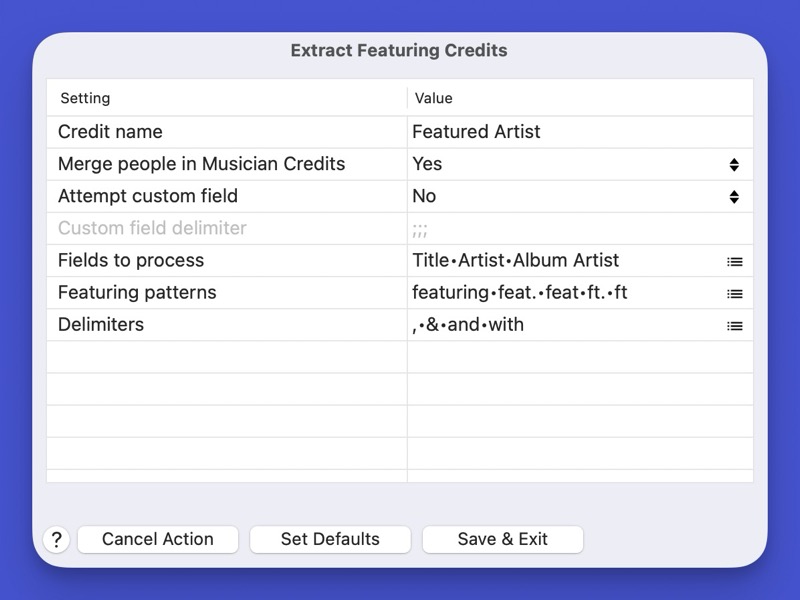
Credit name is the name of the credit to receive the extracted names.
When Merge People in Musician Credits is set to Yes, credits placed in Musician Credits are merged.
When Attempt custom field is set to Yes, a test will be performed to determine if a custom field named in the Credit name field exists. If it does, the results will be placed there as opposed to Musician Credits.
When credits are placed into a custom field, you can specify the delimiter to be used. The multi value delimiter is used by default.
You can select which fields you want to process.
The Featuring patterns row allows you to select which pattern can imply the start of a featuring list. The words are case insensitive. The action ensures that the patterns are in word boundaries, if required. Use the control at the right of the field to display a multi line editor.
The Delimiters row is used to specify the delimiters which can separate names in the featuring list. Use the control at the right of the field to display the multi line editor. The specified items are valid as delimeters within a featuring sequence. Place one item per line. Spaces are significant and are displayed as centered dots. Delimiters which start or end with an alphanumeric character will force a requirement for word boundaries. The sequences are case insensitive. Spaces only make sense in non alphanumeric cases. For example a comma followed by a space will only recognize a comma if it is followed by a space.
Featuring lists can be enclosed before the featuring keyword or immediately after. The action will recognize parenthesis or square brackets as the enclosure sequences. Any text after the closing enclosure is retained in the original field.
Based on the default configuration values, the following examples will all be parsed correctly:
text featuring John, Bob,Jill
text (feat.  John & Bob with Jill)
text ft. [Bob] Live
Content List:
Actions:
Folder: Export Fields To TSV in Text File
Generic Export Fields To TSV in Text File - Helper
Prototype: Export Fields to TSV in Text File
Sample Export Fields: Album Artist + Album + Year
Sample Export Fields Album Artist + Album + Title
Export Sets:
Sample Export Fields: Album Artist + Album + Year
Sample Export Fields Album Artist + Album + Title
File List Filters:
Export Fields: Album Artist + Album + Year
Requirements:
Yate v9.1
History:
| Date | Version | Information |
|---|---|---|
| 2026-04-24 | v1.0 | First release. |