Welcome Guest

Pages: 1 2
A "Replace" starter pack
SnowdogPostDecember 5, 2025, 05:18
Pro
Posts: 370
Registered:
March 15, 2022, 17:12
Normal topicA "Replace" starter pack

When I have a large classical box set, the title field is usually populated by Gracenote or similar in ways that disagree with me.

For example, it may have:

"No. 1" where I prefer "No.1"

"Op. 57" where I would have "Op.57"

"D minor" whereas for me it would be "Dm"

"B-flat minor" & "Bbm"

"C-sharp major" & "C#" etc. etc.

Sometimes major & minor are capitalised, I like a lower case "i" on "in" ("in Dm"), sometimes the have hyphens, sometimes they don't & so on.

There are many examples & many variations.

At the moment I have do do them one by one with the Replace function.

What would be really cool is an action I can customize & add to over time with a list of "find this & change it to this" items. I can manually populate it, as I remember or discover new things that need changing & just run the action once over the Title field of a big box set to catch most of these kinds of things.

I'm away until tomorrow evening, so I won't be around to clarify anything until then.

2MR2PostDecember 5, 2025, 10:48
Avatar photo
Administrator
Posts: 2387
Registered:
August 23, 2012, 19:27
Normal topicA "Replace" starter pack

Yate supports replacement sets. Settings - Replacements. Each set consists of items which have a from and to field.

The sets are easy to use when renaming or in the MFE by using the Case panel. You can always set the Case function to No Change and enable Do replacements.

When creating your replacement set you can make it the default or target it to renaming or the Case function. I recommend making your set the default Case replacement set.

You can add whatever you'd like into the set.

The next release of Yate will allow regular expression items in a replacement set as well as the current simple text items.

SnowdogPostDecember 9, 2025, 18:05
Pro
Posts: 370
Registered:
March 15, 2022, 17:12
Normal topicA "Replace" starter pack

Outstanding! (I'm back! 😀 )

SnowdogPostDecember 9, 2025, 18:24
Pro
Posts: 370
Registered:
March 15, 2022, 17:12
Normal topicA "Replace" starter pack

Okay, so, slightly confused... I've made my set. Being slightly awkward, I named it "Classical" & I can see the "no change" option in the case MFE but I can't see how to choose my Classical list in order for it to make the changes.

SnowdogPostDecember 9, 2025, 18:26
Pro
Posts: 370
Registered:
March 15, 2022, 17:12
Normal topicA "Replace" starter pack

Oops. Set is as default. Now it works.

2MR2PostDecember 9, 2025, 19:08
Avatar photo
Administrator
Posts: 2387
Registered:
August 23, 2012, 19:27
Normal topicA "Replace" starter pack

Default or Case if that's what you're using in the MFE. Default covers Rename and Case.

In the next release the MFE's Replace tab lets you perform the replacements by explicitly specifying a set. ie. the default sets are ignored.

SnowdogPostDecember 10, 2025, 11:55
Pro
Posts: 370
Registered:
March 15, 2022, 17:12
Normal topicA

I only have one list, so it doesn't really matter. But I think my brain wants to see the list named in the editor, rather than just knowing it's the default, but that's just me. (It could be six months before I come back to using the list. I'll have forgotten by then. 😆 )

I have an issue which may or may not be a bug.

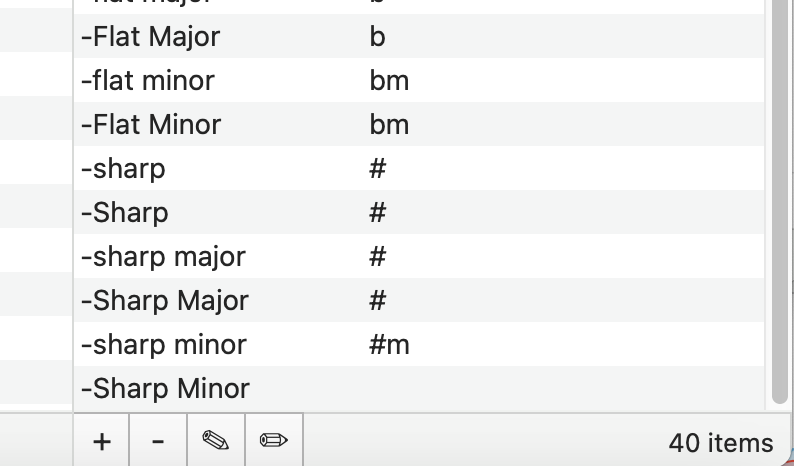
One of the items in my list changes -sharp minor to #m (so G-sharp minor to G#m)
The next changes -Sharp Minor to #m (so G-Sharp Minor to G#m)

Whenever I come back to the list the "to" field is empty (see screenshot). I've changed it three times now & added in the "to" field but it keeps showing up empty.

This means that, having run the list, if it's treating the apparently empty "to" field as a request to delete "-Sharp Minor" completely, I have no way of knowing if any of the musical keys started out as "-Sharp Minor" & now just look like major keys.

The thing is, because D is the same as D major, I have things in the list that change "major" to nothing, so D major becomes D, D sharp major becomes D#, etc. If the empty "to" field for "-Sharp Minor" has done that, I have no way of knowing apart from reverting to original field values & starting again or scouring the Discogs entry for "Sharp Minors" & checking them against what I have.

It's probably fine because I haven't found any other capitalised entries in this particular box set, I just wanted to flag it & get your thoughts.

It might be worth adding that there are versions of the above without the leading hyphen which are fine.

Image

2MR2PostDecember 10, 2025, 12:02
Avatar photo
Administrator
Posts: 2387
Registered:
August 23, 2012, 19:27
Normal topicA "Replace" starter pack

You can name the lists. 'default' is just an indicator.

I'll have a look at the set a little later when I'm back at my Mac. Can you export and send me the set. Select the set (not the items) and click on the export button. Please send it to support@2manyrobots.com

SnowdogPostDecember 10, 2025, 12:16
Pro
Posts: 370
Registered:
March 15, 2022, 17:12
Normal topicA

You can name the lists. 'default' is just an indicator.

Haha, yes, I realised that after the penny finally dropped. 😆

2MR2PostDecember 10, 2025, 14:59
Avatar photo
Administrator
Posts: 2387
Registered:
August 23, 2012, 19:27
Normal topicA "Replace" starter pack

I've hammered away at this for about 30 minutes now and I think I made it happen once ... although I'm not sure. I closed the Settings window before tabbing or or hitting Return in the to field which had the focus. I'm not sure because I can't make it happen again. I've tried 🙁

So unless you can find a deterministic way of making it happen ... I'm at a loss.

However, you have a number of other issues.

First off you can make a replacement item case insensitive by placing \~ at the start of the From field. eg. \~-flat

However, even if you do that you still have issues. The replacement items are applied from first to last. As you have items named -sharp and -Sharp which precede -sharp major and -Sharp Major, the major items will never be hit as they will no longer exist. Unfortunately the list is automatically sorted. In the upcoming v8.4, the list is not sorted and you can drag and drop the items. In v8.4 you could put the longer variants first.

I'll see if I can patch it in the release stream.

Pages: 1 2
Mingle Forum by Cartpauj | Version: 1.1.0beta | Page loaded in: 0.051 seconds.