Welcome Guest

Pages: 1
Import tags from different files
foxPostMay 22, 2026, 04:47
Newbie
Posts: 9
Registered:
May 29, 2025, 08:46
Normal topicImport tags from different files

Would it be possible to have an action that copies selected field tags (in my case Composer) from different files in another folder? Maybe this action already exists but I couldn't find it.

Let's say I have Album (1) in ~/Music/Various - Album1 (2025)/ and it's missing the Composer tags.

I have the exactly same Album (2) in /Volumes/Music/Various Artists - Album2 (2025)/ but this one has all the Composer tags I need.

My goal would be import the Composer tags from Album (2) inside Album (1) without copying them manually.

Unfortunately neither Discogs nor Musicbrainz have those tags.
Image
Image

2MR2PostMay 22, 2026, 07:21
Avatar photo
Administrator
Posts: 2462
Registered:
August 23, 2012, 19:27
Normal topicImport tags from different files

You can do it in the UI or via an action.

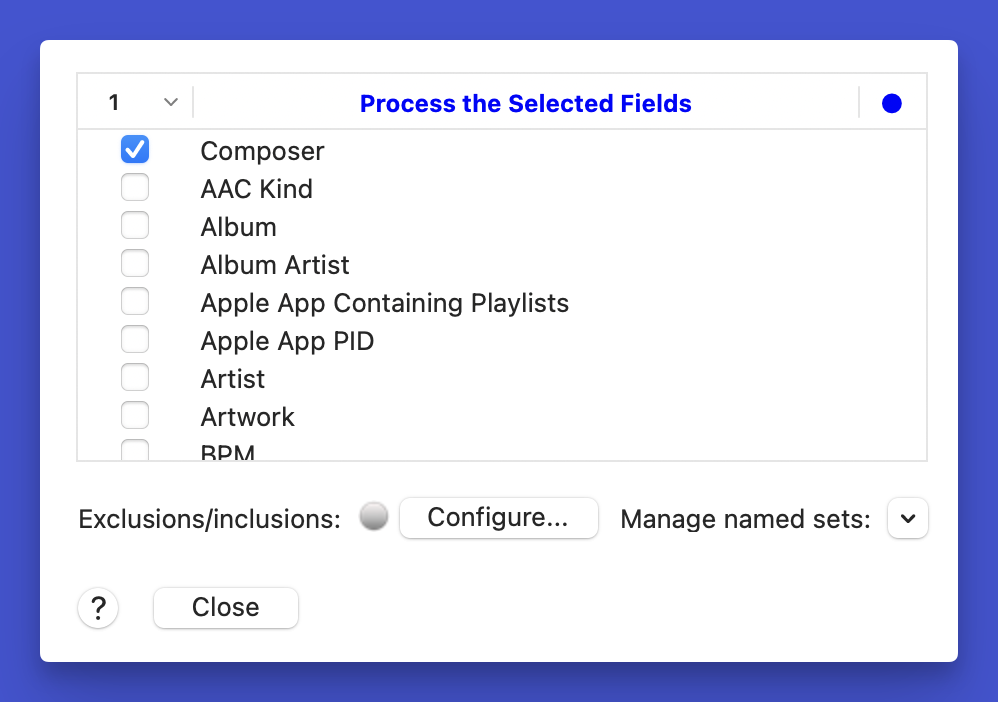
In the UI do an Actions>Copy Metadata>Configure Copy Metadata. Effectively set only the Composer field. See the screenshot. The are context menu items to select or deselect all. The table either contains everything to be copied or items not to be copied. It's a matter of preference.

Load up two copies of an album and either do an Actions>Copy Configured Metadata Top to Bottom or Copy Configured Metadata Bottom to Top. The changes are not committed ... so you can revert them via Edit>Revert to Initial State.

This could get tedious if you have hundreds or thousands of albums to do. If you have two disjoint roots for the source and destination, you can walk the file files in the Batch Processor and do it all at once with a simple action. Let me know if you want to do this and I'll send you an action. In your example the filenames are the same which makes it easy.
Image

2MR2PostMay 22, 2026, 07:23
Avatar photo
Administrator
Posts: 2462
Registered:
August 23, 2012, 19:27
Normal topicImport tags from different files

If you load two copies of an album in the UI you may have to click on the table header and do a Sort by Folder to separate them correctly.

foxPostMay 22, 2026, 16:42
Newbie
Posts: 9
Registered:
May 29, 2025, 08:46
Normal topicImport tags from different files

thank you for your help! 🙂

Pages: 1
Mingle Forum by Cartpauj | Version: 1.1.0beta | Page loaded in: 0.01 seconds.