Welcome Guest

Pages: 1
Move & rename image file
SnowdogPostMarch 15, 2024, 16:50
Pro
Posts: 374
Registered:
March 15, 2022, 17:12
Normal topicMove & rename image file

Okay, here's an interesting one.

It's so similar to other actions you've written for me, but I've double checked & I can't see one that'll do this particular thing.

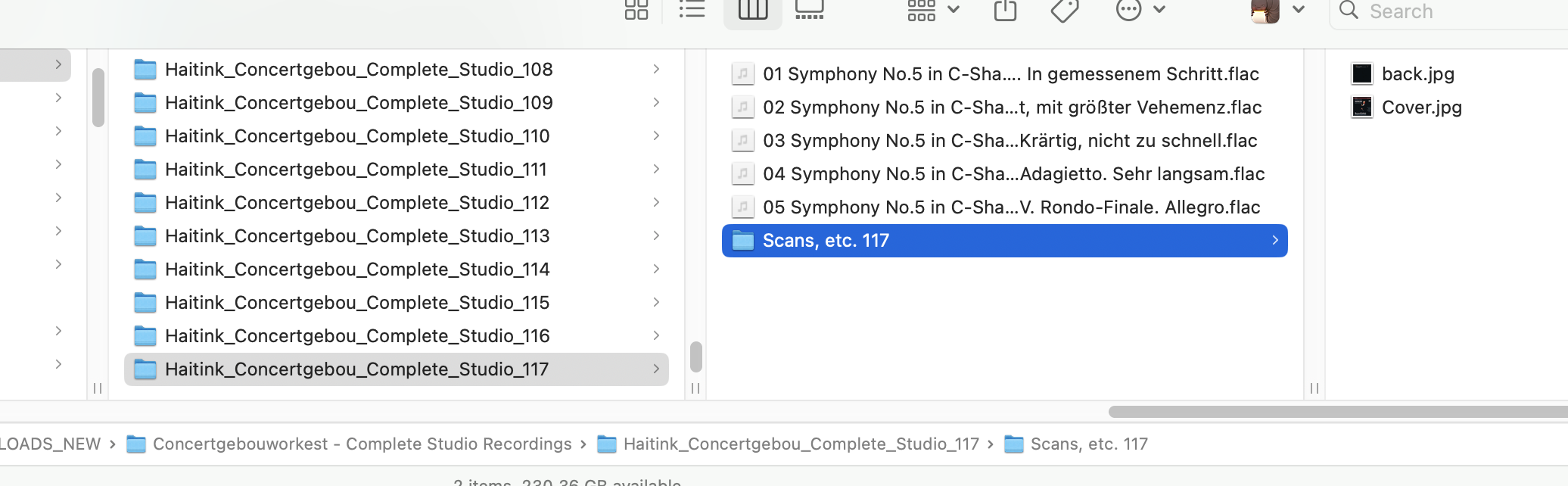
As you can see from the screenshot, I have a 117 disc box set. In each numbered folder is a numbered sub folder "Scans, etc. XXX" & in there is a "back" & "Cover" image.

What I need to do is to move the "Cover" image up a level & add "Disc_XXX_"

Where the XXX is the disc number.

Everything is already padded to 3 digits.

I'd say "is that do-able" but I've learned everything id do-able.

I suppose the question is "have I explained that clearly enough"?

Image

2MR2PostMarch 15, 2024, 17:04
Avatar photo
Administrator
Posts: 2397
Registered:
August 23, 2012, 19:27
Normal topicMove & rename image file

I'd say "is that do-able" but I've learned everything id do-able.

pretty much.

I suppose the question is "have I explained that clearly enough"?

Nope 🙂

As an example the folder ending in _117 contains a folder named Scans, etc. 117 which contains Cover.jpg.

Cover.jpg gets moved (copied?) up a level. So far so good. What does Disc_117_ get added to? Disc_117_Cover.jpg or something else?

SnowdogPostMarch 15, 2024, 17:23
Pro
Posts: 374
Registered:
March 15, 2022, 17:12
Normal topicMove & rename image file

Ah, yes... So moved up one level, no need to copy, I don't think.

"Disc_117_Cover.jpg" is correct, so that each cover image sits with the audio files & has the name number as the disc number.

So the result would look like the attached & all that would be left in the Scans folder is the back cover image.

Any clearer?

Image

2MR2PostMarch 15, 2024, 17:43
Avatar photo
Administrator
Posts: 2397
Registered:
August 23, 2012, 19:27
Normal topicMove & rename image file

got it :). Coming up shortly

2MR2PostMarch 15, 2024, 18:30
Avatar photo
Administrator
Posts: 2397
Registered:
August 23, 2012, 19:27
Normal topicMove & rename image file

Download the action at:

https://2manyrobots.com/actions/Scans,-etc.-Move-Cover.zip

The action is named: Scans, etc. Move Cover.jpg

Everything is case sensitive and specified spaces are required: Scans,{space}etc.{space}# and Cover.jpg

# can contain any number of digits.

No error messages are issued. The constraints are met, or not.

2MR2PostMarch 15, 2024, 18:32
Avatar photo
Administrator
Posts: 2397
Registered:
August 23, 2012, 19:27
Normal topicMove & rename image file

BTW: you must select the folder containing the ..._# folders as the root.

SnowdogPostMarch 15, 2024, 20:16
Pro
Posts: 374
Registered:
March 15, 2022, 17:12
Normal topicMove & rename image file

Amazing! Worked perfectly. 🙂

Pages: 1
Mingle Forum by Cartpauj | Version: 1.1.0beta | Page loaded in: 0.063 seconds.