Welcome Guest

Pages: 1
Work/part page using "Classical Metadata from Title " action
five5357PostFebruary 8, 2026, 01:46
Newbie
Posts: 4
Registered:
February 8, 2026, 05:31
Normal topicWork/part page using "Classical Metadata from Title " action

Greetings. Switching to Roon a couple months ago necessitated a better tag editor, primarily so I can take advantage of Roon's (classical) composition detection. Using "extract work and part from title", I end up with both work and part in the work field for Roon (I have Roon set in prefs>audio>common>application).

For example, a full title tag (sourced from Musicbrainz wizard) is "Piano Sonata No. 6 in F major, Op. 10 No. 2 - I. Allegro", all of which ends up as the Roon work tag after running "extract work and part from title". I'd be grateful for any help and suspect I'm missing something obvious.

Related, Roon seems rather fussy about autodetecting compositions such as the example above: "Op. XX No. YY", and prefers the format "Op. XX/YY". I didn't see any options or other Roon-related actions that would reformat the former into the latter, either to reformat the title tag prior to running "extract work and part from title", or as an option while running that action. Is one or the other possible?

Many thanks.

2MR2PostFebruary 8, 2026, 11:52
Avatar photo
Administrator
Posts: 2419
Registered:
August 23, 2012, 19:27
Normal topicWork/part page using "Classical Metadata from Title " action

The Title field is not formatted according to the MusicBrainz spec. The metadata must have been entered incorrectly.

The - before I. Allegro should have been a :

If you manually change the - to a : it will work as expected.

I'll look into this and update the action accordingly. I'll have to delve into the code as there are variants of No.and Op. that are permitted. I'll look into an option to see if it's possible to handle the - as well

five5357PostFebruary 8, 2026, 12:57
Newbie
Posts: 4
Registered:
February 8, 2026, 05:31
Normal topicWork/part page using
Quote from 2MR2 on February 8, 2026, 11:52

The Title field is not formatted according to the MusicBrainz spec. The metadata must have been entered incorrectly.

The - before I. Allegro should have been a :

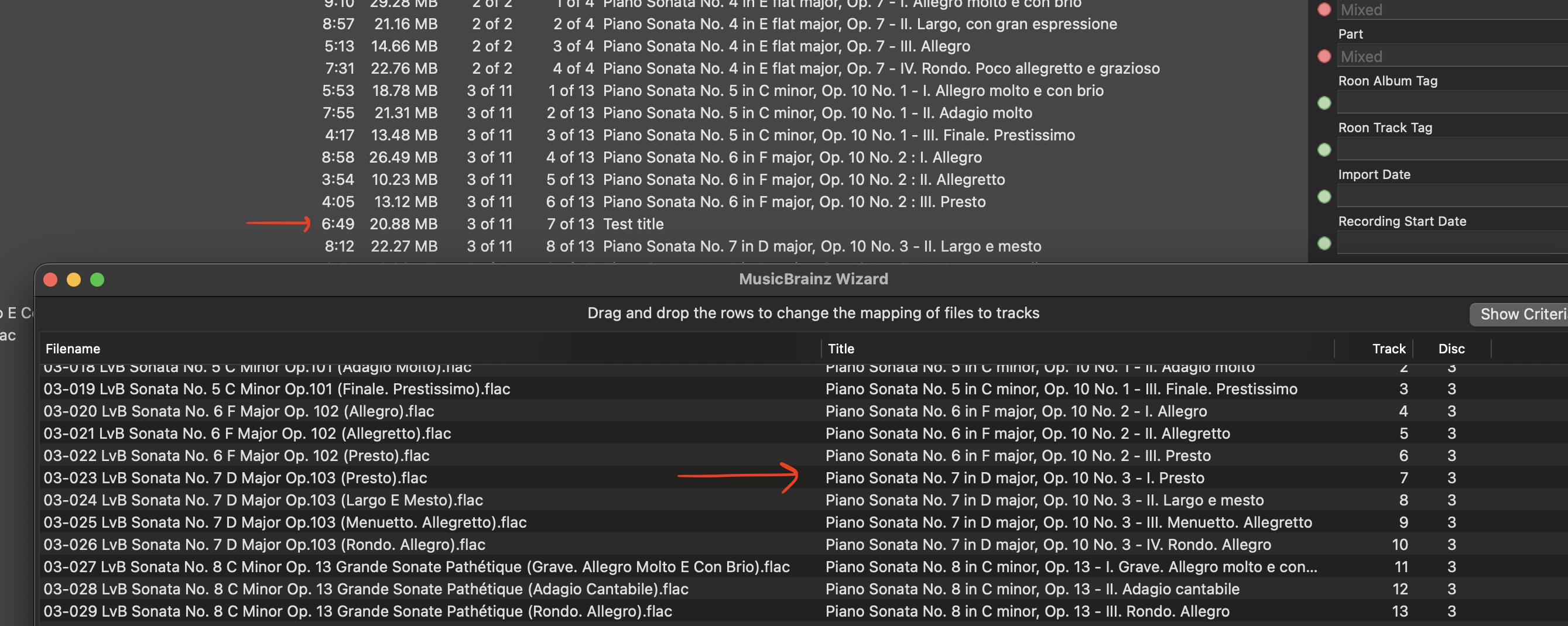
I checked again and Musicbrainz wizard is calling the correct album, dashes included in titles. (see screenshot). Maybe you meant that data was entered incorrectly in Musicbrainz.

If you manually change the - to a : it will work as expected.

This did work, thanks.

I'll look into this and update the action accordingly. I'll have to delve into the code as there are variants of No.and Op. that are permitted. I'll look into an option to see if it's possible to handle the - as well

Thanks again.

Did my question about Roon's preference for Opus # formatting make sense? Related to the Yate action for Roon work & part, that is.
Image

2MR2PostFebruary 8, 2026, 14:37
Avatar photo
Administrator
Posts: 2419
Registered:
August 23, 2012, 19:27
Normal topicWork/part page using "Classical Metadata from Title " action

Yep I meant that the data was entered incorrectly in the MusicBrainz database.

Yep I understood. I'll check if it can be added to the action. The best place to fix these issues is in the actual action statement which does the parsing ... however I'll see if I can do something in the action. It may be tricky as Opus, Op, Op. all are parsed. The current extraction process finds the Opus to be 10 but does not include the No. part. As I said I'll have to look at the code.

2MR2PostFebruary 8, 2026, 16:33
Avatar photo
Administrator
Posts: 2419
Registered:
August 23, 2012, 19:27
Normal topicWork/part page using "Classical Metadata from Title " action

Actually I'm a little surprised as Roon typically likes MusicBrainz formatting. Further, the no. notation is pretty much standard.

I thought that I could simply change the Title field with a regex but that doesn't work as the parsing then gets an error on the opus formatting. This means I have to do the Work and Part extraction first, then modify the opus sequence.

Try calling the following action instead of Extract Work and Part from Title. It'll change the Op.,no. sequences to Op. n/m

https://2manyrobots.com/actions/Adjust-Opus-Sequences-in-Title-for-Roon.zip

I'm not sure if you needed it modified in Title and/or Work field. The action does both. If you only want one or the other, open the action and disable the unwanted statement. Line 4 is Work. Line 5 is Title.

Let me know if it works for you.

five5357PostFebruary 9, 2026, 13:18
Newbie
Posts: 4
Registered:
February 8, 2026, 05:31
Normal topicWork/part page using "Classical Metadata from Title " action

Thanks very much for getting right on work on this!

Roon doesn't seem bothered by title field contents so long as work & part are as it expects, in order to be recognized as a multi-part composition in Roon's meta db.

If one is opting to use file tags for multipart composition recognition, personal experience shows that opus must be formatted "Op. n/m" but as I said, I'm new to Roon.

I tested a handful of title field permutations with Adjust-Opus-Sequences-in-Title-for-Roon.
This works as intended: Op. NN No. MM

These do not:
Op. NN, No. MM
Op NN No MM
Any string lacking a space btwn label and identifier.
Any string including Nr or N°

I don't know how far into the weeds it makes sense to go -- there seems to be no end to the thorns in Op/Mv organization.

Hyphens are still not recognized though it sounded like you haven't broached that task.

2MR2PostFebruary 9, 2026, 16:50
Avatar photo
Administrator
Posts: 2419
Registered:
August 23, 2012, 19:27
Normal topicWork/part page using "Classical Metadata from Title " action

I've updated the action to handle what I think is all cases.

As far as the - as opposed to the : I think it is somewhat dangerous as there is no reason why the title cannot contain a -. That being said I've written an action to test if a track can be identified as classical; if it can and Part is empty the last - in Title, (if any), will be replaced by a :. The files are modified but not saved. You can always revert if you do not like the results.

Download:

https://2manyrobots.com/actions/Classical-Title-Manipulation.zip

The bundle contains the following:

Folder: Classical Title Manipulation
Attempt to Fix Title for Classical (Version 1.0)
Correct Missing : in Classical Title (Version 1.0)
Adjust Opus Sequences in Title for Roon v2 (Version 2.0)

Adjust Opus Sequences in Title for Roon v2 is an updated version of the previous action. You can delete the old one. The new one only modifies Work ... not Title.

Correct Missing : in Classical Title tries to properly replace - with :

Attempt to Fix Title for Classical calls them both in the correct order.

Have fun.

five5357PostFebruary 11, 2026, 10:56
Newbie
Posts: 4
Registered:
February 8, 2026, 05:31
Normal topicWork/part page using "Classical Metadata from Title " action

Adjust Opus... is working well.

I agree that Correct Missing : in Classical Title is not ideal. The action works properly when the title's last hyphen is in the expected location, but that's not always true, as you point out. I wonder if it'd be more accurate to search for a hyphen's presence immediately following whatever variation of opus is present. I'm sure there are exceptions to this rule, as well.

Some pieces/tracks have multiple Movement descriptors separated by hyphens, or the single-track-length piece is a handful of shorter variations, all separated by hyphens. These are more rare than not (in my collection) so it likely makes sense to just rely on manually editing here.

Thank you again for the work!

2MR2PostFebruary 11, 2026, 11:12
Avatar photo
Administrator
Posts: 2419
Registered:
August 23, 2012, 19:27
Normal topicWork/part page using "Classical Metadata from Title " action

Yah there is no perfect way tp correct malformed metadata. Even looking for the first - after Op. would not work as some pieces have parts but no Opus metadata 🙁

Pages: 1
Mingle Forum by Cartpauj | Version: 1.1.0beta | Page loaded in: 0.282 seconds.