Is there a simple way to add actor and director metadata such that it will appear in Apple's awful TV app?
No. There is a way but it is not simple. The TV app is the only app which can make the Music look good.
You do not have to use the Combined Credits Editor ... ever. You can directly edit roles in the fields and can also do so in the Multi Field Editor on the Credits panel. The Conbmined Credits Editor is far more complicated and it does far more.
If your video is in TV; loaded in Yate and currently linked you can try the following:
First off make sure the Process iTunMOVI for files with video setting is enabled in Settings-Audio-MPEG-4.
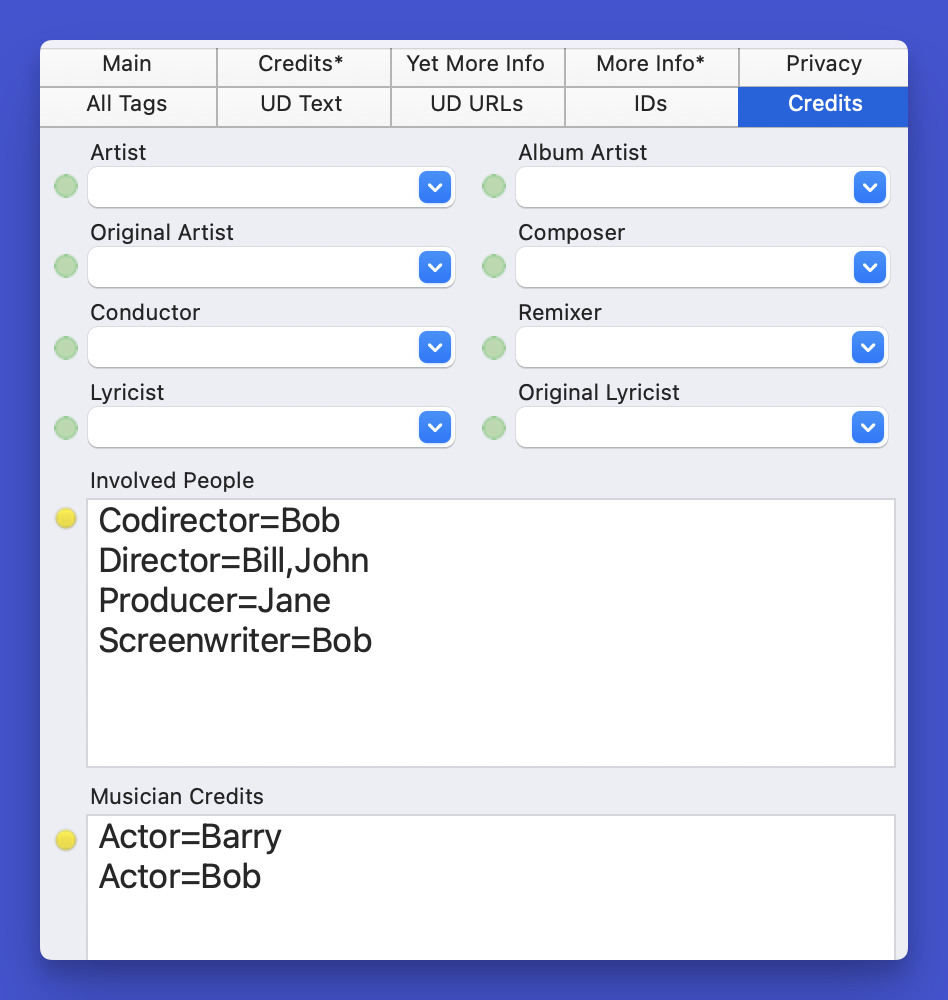
Directly edit in Musician Credits or Involved People.
In Involved people you can specify: Director, Codirector, Producer and Screenwriter
In Musician Credits you can specify: Actor
Multiples are treated the same as an any other item in the two fields: For example Actor=Bob,Bill,Jane. Alternately you can place them on separate rows.
I've just tried it and it works. However, working with TV is terrible.
Doing the above guarantees that when you save the file the awful iTunMOVI items is updated in the field. There's no guarantee that the TV app will update correctly. I've had to change the view in TV; sometimes close and reopen; and sometimes remove the content and put it back.
If you look at the screenshots ... I managed to add those credits simply by updating the file when linked to TV. However, nothing updated in TV until I switched the view and then went back to it. 🙁

|


 April 20, 2026, 14:59
 Newbie

 Administrator
 Mingle Forum by Cartpauj | Version: 1.1.0beta | Page loaded in: 0.016 seconds.