Welcome Guest

Pages: 1
Multivalue delimiter in tsv fille
rh2021PostMay 22, 2026, 20:36
Newbie
Posts: 9
Registered:
May 3, 2021, 03:41
Normal topicMultivalue delimiter in tsv fille

What is the correct character(s) to use in a .tsv file to ensure the result in Yate is correct and multi-valued?

My field (cell) in the tsv file ('database') for musician credits is:
Drums=Lee Carey;;;Bass=Nic Dalton;;;Violin=Eleanor Gray;;;Cello=Simeon Johnson

The results in Yate (after saving) :
Drums=Lee Carey
Drums=Bass=Nic Dalton
Drums=Violin=Eleanor Gray
Drums=Cello=Simeon Johnson

I have experimented with
\n
\m
|
,

and none produce a proper multi-value break.

Ralph H

2MR2PostMay 22, 2026, 21:02
Avatar photo
Administrator
Posts: 2457
Registered:
August 23, 2012, 19:27
Normal topicMultivalue delimiter in tsv fille

Yate follows the ID3 specification for Involved People and Musician credits.

The field consists of multiple lines specified as: instrument=musician{,musician}.... When the data is saved to files, empty lines and unnecessary whitespace is automatically removed.

.

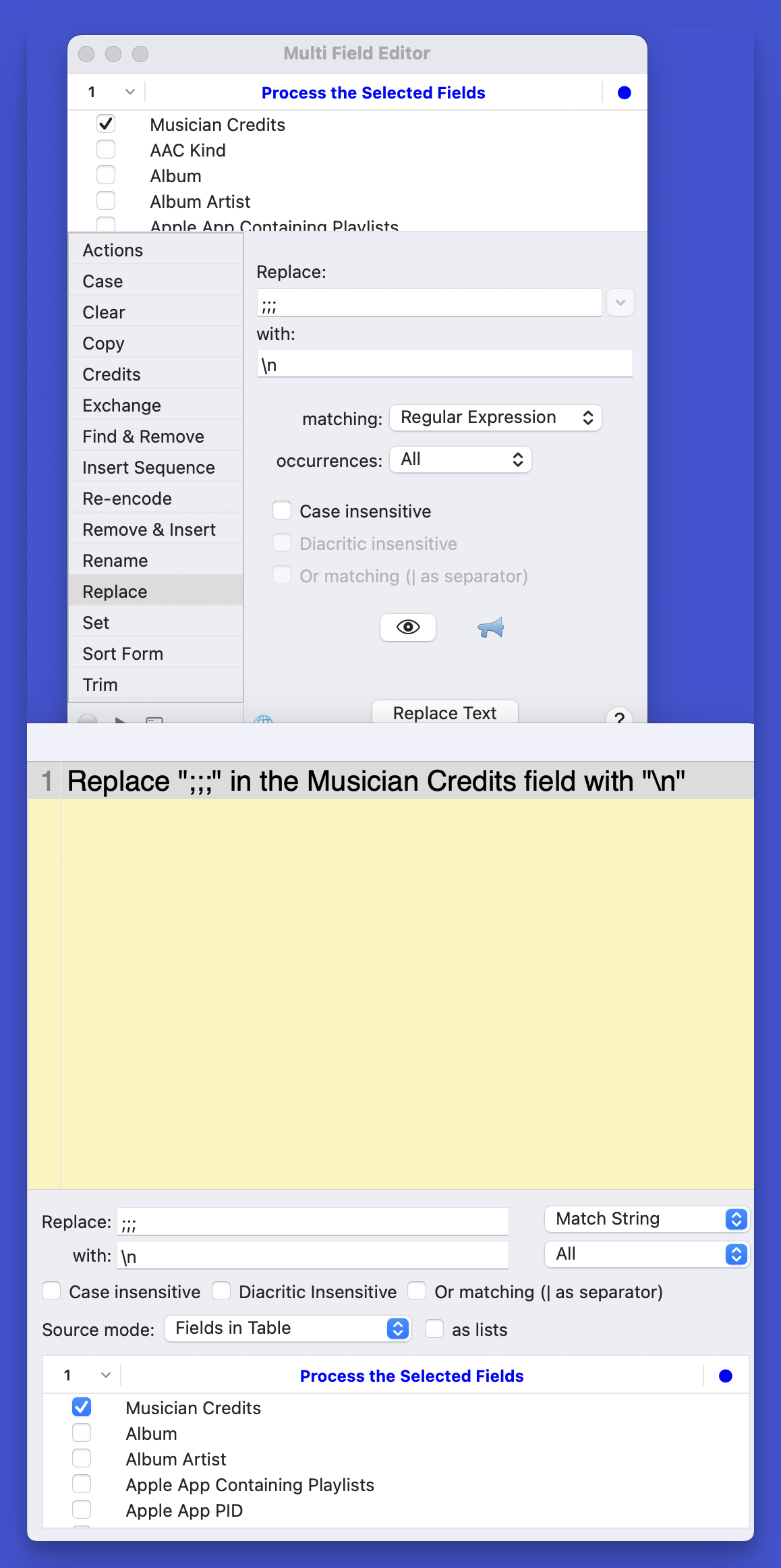
It's next to impossible to do in a TSV file as there is no way to express the newline characters. You can do it in a properly encoded CSV file. If you really have to use TSV use any sequence you wish to replace the newline characters. For example ;;; as you did in your example. After importing use the Multi Field Editor or an action to replace the ;;; with a newline. If you use the MFE you'll have to use a regular expression for the replace as you need the \n escape sequence. In an action you can do a simple text replace.

The attached screenshot shows both.

Image

rh2021PostMay 22, 2026, 21:28
Newbie
Posts: 9
Registered:
May 3, 2021, 03:41
Normal topicMultivalue delimiter in tsv fille

Bit confused
I created an export set
and an action which exported this export set (using tsv rather than csv)
Using a data management database, I repopulated the tsv file.
Using 'Apply database values to open files' from the context menu

Do I now have to an additional process to clean up the data?
Can I make it part of the context menu action "Apply database values to open files"?

Ralph H

2MR2PostMay 22, 2026, 21:46
Avatar photo
Administrator
Posts: 2457
Registered:
August 23, 2012, 19:27
Normal topicMultivalue delimiter in tsv fille

If you created a TSV via an action you would have received a warning saying that you have to use an alternate multi line delimiter.

The three steps that you performed taken by themselves are correct. The entire process does not guarantee the correct formatting of the data. In this case the Musician Credits data in the TSV file is not correct. However you repopulated the TSV you ended up with:

Drums=Lee Carey;;;Bass=Nic Dalton;;;Violin=Eleanor Gray;;;Cello=Simeon Johnson

It's just not the correct encoding.

There's a number of things which can be done. The simplest is to replace the Using 'Apply database values to open files' from the context menu by an action which you can run from the same context menu. The action will do the apply and clean up Musician Credits. This way you can leave the encoding by slightly changing the workflow.

I'll gladly write the action for you. Go to Settings - Export Sets and export your Export Set as a zip file. I probably can do without it but it will be a little easier if I see what you're exporting. Email the zip to support@2manyrobots.com

rh2021PostMay 22, 2026, 22:37
Newbie
Posts: 9
Registered:
May 3, 2021, 03:41
Normal topicMultivalue delimiter in tsv fille

Email sent

Cheers

Ralph H

2MR2PostMay 24, 2026, 08:46
Avatar photo
Administrator
Posts: 2457
Registered:
August 23, 2012, 19:27
Normal topicMultivalue delimiter in tsv fille

For anyone else reading this post ... an action was supplied. As it does a few other things as well it has not been posted. If anyone is interested, reach out and the action will be supplied.

Pages: 1
Mingle Forum by Cartpauj | Version: 1.1.0beta | Page loaded in: 0.025 seconds.