Welcome Guest

Pages: 1 2
Editing File Paths
SnowdogPostApril 11, 2022, 14:05
Pro
Posts: 374
Registered:
March 15, 2022, 17:12
Hot topicEditing File Paths

Okay so here's something related that's very confusing.

Earlier on, after I asked you about this but whilst I was waiting for a reply, I was having a look around to see if I could figure it out & clicking on things I probably had no business clicking on when I suddenly noticed that my folders had changed to how I wanted them.

I had no idea how that had happened, so I moved the "correct" ones into a remote location & replaced them with "incorrect" ones.

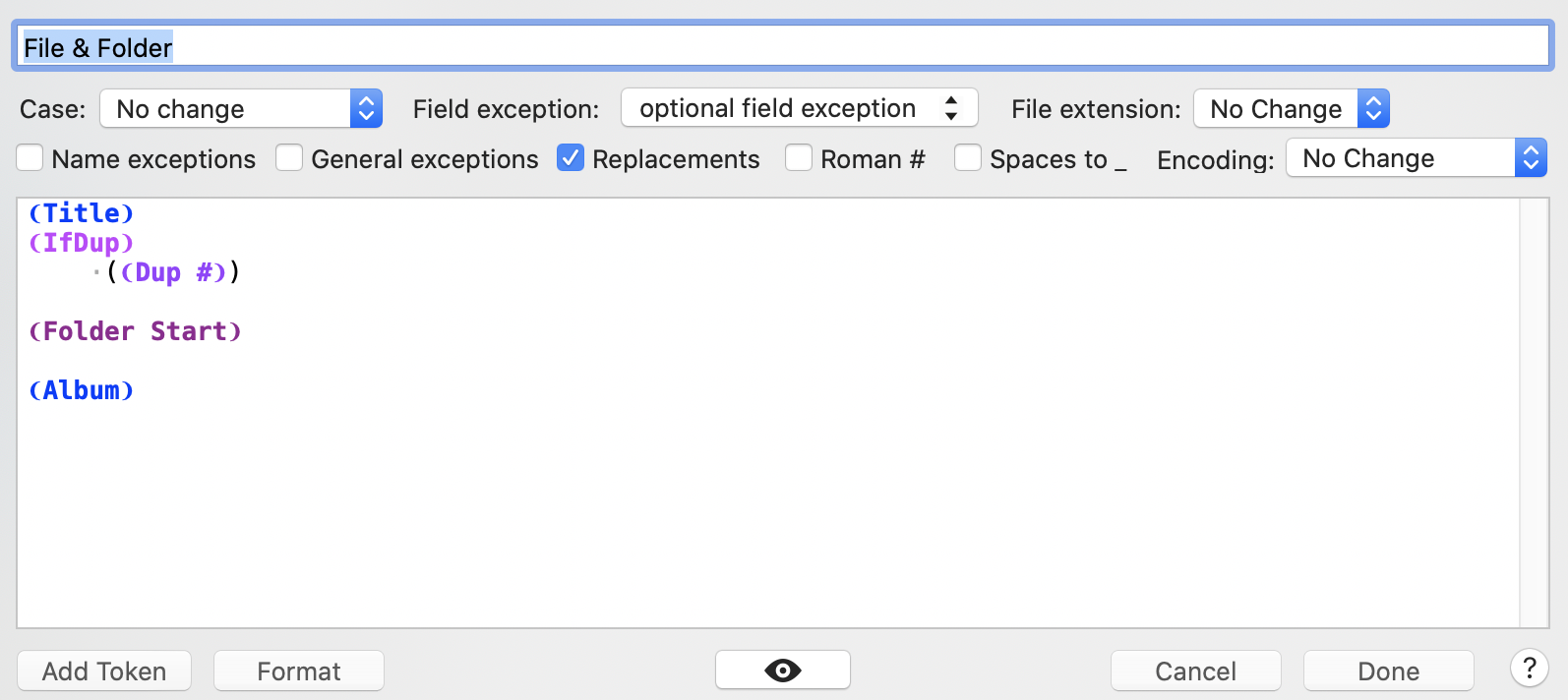
Now I was just trying to figure out what I did & I managed to do it again & I did it by choosing an action called "File & Folder" that was already in Yate when I installed it.

It seems to do exactly what I want, but I've no idea why.

It looks like this.

Image

SnowdogPostApril 11, 2022, 14:07
Pro
Posts: 374
Registered:
March 15, 2022, 17:12
Hot topicEditing File Paths

Is it taking something from the cue files inside the folder, perhaps?

Image

2MR2PostApril 11, 2022, 14:09
Avatar photo
Administrator
Posts: 2397
Registered:
August 23, 2012, 19:27
Hot topicEditing File Paths

Ahhh, you're not running the action. You're doing a rename in the UI. If you want the action to appear on the rename menu:

- open the Action Manager from the Actions menu
- look for and select 'Snowdog: Sample folder rename'.
- click in the Menu column on the same row and select R Rename
- the File>Rename menu (and toolbar rename icon) will now have a submenu named Actions which will have a Snowdog: Sample folder rename item.

When you click on the action name ... now on the rename menu ... it'll run the action

Sorry, I could have done this for you but I assumed you would do an Actions>User Defined>Snowdog: Sample folder rename

SnowdogPostApril 11, 2022, 14:16
Pro
Posts: 374
Registered:
March 15, 2022, 17:12
Hot topicEditing File Paths

Ah, right! I didn't know that was there. No, running it as you'd intended works perfectly well, thanks.

2MR2PostApril 11, 2022, 14:18
Avatar photo
Administrator
Posts: 2397
Registered:
August 23, 2012, 19:27
Hot topicEditing File Paths

Great 😀

SnowdogPostApril 11, 2022, 14:51
Pro
Posts: 374
Registered:
March 15, 2022, 17:12
Hot topicEditing File Paths

Any thoughts on why that other script upthread works?

2MR2PostApril 11, 2022, 14:56
Avatar photo
Administrator
Posts: 2397
Registered:
August 23, 2012, 19:27
Hot topicEditing File Paths

Not sure what other action you can have which will do the same thing. If you look at the Action Manager (Actions>Action Manager) you'll see a list of actions that are installed. If my records are accurate, the only other action I sent you was about extracting artwork.

If you run the latest action from the Actions>User Defined or Rename>Actions menus, the same action will be run.

I'm not sure what other action you could be running.

SnowdogPostApril 11, 2022, 15:28
Pro
Posts: 374
Registered:
March 15, 2022, 17:12
Hot topicEditing File Paths

It's the one shown above, called "File & Folder".

2MR2PostApril 11, 2022, 15:47
Avatar photo
Administrator
Posts: 2397
Registered:
August 23, 2012, 19:27
Hot topicEditing File Paths

File & Folder is a simple rename template which renames files to the Title field and Folders to the Album field. It's not an action.

We're getting stuck on my literal interpretation of the problem descriptions. If you have metadata which can be combined in any manner to rename files and folders then rename templates will do it without involving any actions.

Pages: 1 2
Mingle Forum by Cartpauj | Version: 1.1.0beta | Page loaded in: 0.053 seconds.