Welcome Guest

Pages: 1 2
Multiple data in mp4 files
DmitryPostMay 5, 2026, 06:42
Newbie
Posts: 16
Registered:
December 30, 2024, 12:32
Normal topicMultiple data in mp4 files

Hello,

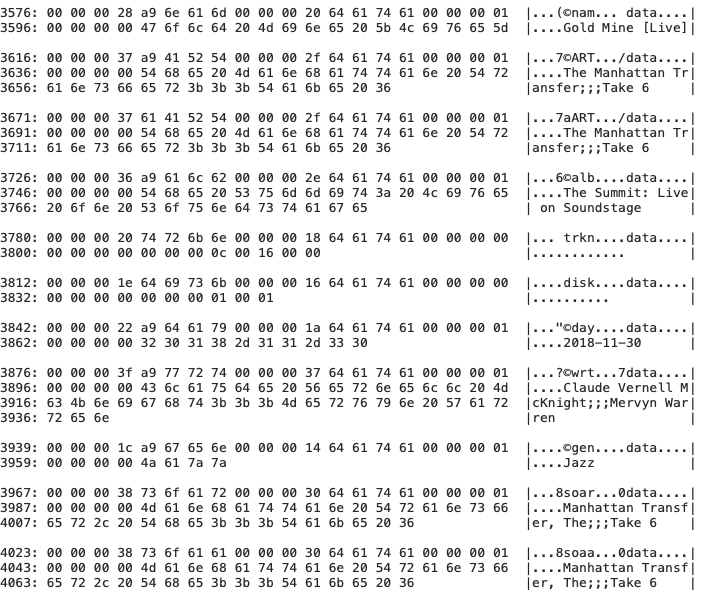
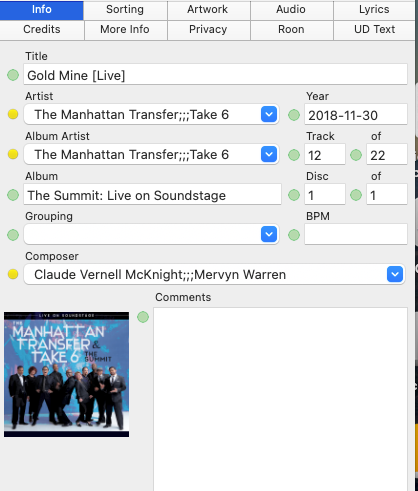
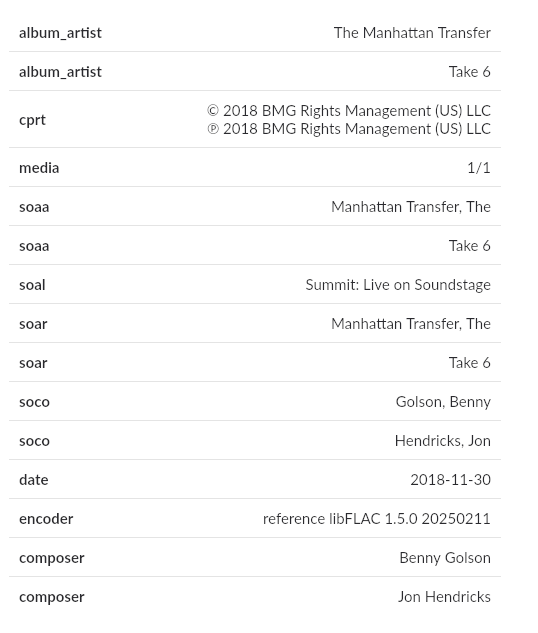
It seems like writing multiple data into mp4 files isn't working for me. I'm using the "Single atom/Multiple data" configuration, but the result still looks like this: artist1;;;artist2 (see screenshot attached).
You gave an example of what the result should look like when configured correctly, and naturally, a delimiter wasn't displayed there.
I've tried different encoders (dBpoweramp, XLD), reset Yate to default, but nothing works.
What am I doing wrong? Maybe there's another setting I need to adjust?

Many thanks in advance,
Image

2MR2PostMay 5, 2026, 07:32
Avatar photo
Administrator
Posts: 2443
Registered:
August 23, 2012, 19:27
Normal topicMultiple data in mp4 files

The Multi value write method is only applied when saving the m4a files. If your multi value delimiter is ;;; and you have Single Atom/Multiple Data set, each name will be written as multiple data items. I've just tested this by manually entering your data. Here's my results:

29142109: 00 00 00 44 61 41 52 54 00 00 00 26 64 61 74 61 00 00 00 01 |...DaART...&data....|
29142129: 00 00 00 00 54 68 65 20 4d 61 6e 68 61 74 74 65 6e 20 54 72 |....The Manhatten Tr|
29142149: 61 6e 73 66 65 72 00 00 00 16 64 61 74 61 00 00 00 01 00 00 |ansfer....data......|
29142169: 00 00 54 61 6b 65 20 36 |..Take 6 |

Re-encoding won't do anything as it starts from scratch and the multi value encoding is set when saving. You can test in Yate as follows:

- Set Multi value write method to Single Atom/Multiple Data
- File>Save Selected Files>Save Always (no metadata changes required)
- View>Raw Data
- Search for Take 6

DmitryPostMay 5, 2026, 07:56
Newbie
Posts: 16
Registered:
December 30, 2024, 12:32
Normal topicMultiple data in mp4 files

Thanks a lot for a quick response.

Of course, I save all the files I edit. I just checked again and saved them twice via "save always", but the result is still the same—it’s different from yours.
I must be missing something important 🙁
Image
Image
Image

2MR2PostMay 5, 2026, 08:12
Avatar photo
Administrator
Posts: 2443
Registered:
August 23, 2012, 19:27
Normal topicMultiple data in mp4 files

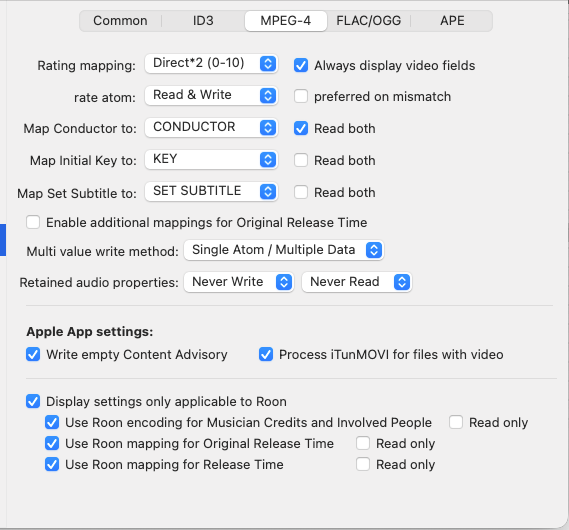
The settings screenshot sheds the light 🙂

You're encoding for Roon which changes quite a bit. To the best of my knowledge Roon does not support Single Atom/Multiple Data ... but they will decompose based on a ; which allows ;;; to work. The MPEG-4 writer disables the atom format when detecting that you're writing for Roon.

2MR2PostMay 5, 2026, 09:14
Avatar photo
Administrator
Posts: 2443
Registered:
August 23, 2012, 19:27
Normal topicMultiple data in mp4 files

I will test later today if Roon's support for alternate multiple MPEG-4 data has changed. However, I've just tested and they correctly parse the ;;; sequence.

DmitryPostMay 5, 2026, 09:19
Newbie
Posts: 16
Registered:
December 30, 2024, 12:32
Normal topicMultiple data in mp4 files

Hallelujah! It works.

That's interesting, it only works after resetting the settings to default. Enabling the Roon's settings just once irreversibly changes how tags are written. Disabling the Roon's setting and resaving the files won’t make a difference—raw view still shows “artist1;;;artist2.”

Hmm, it could be a dilemma: reset the settings and resave all my files (bye-bye Apple Music) , or continue editing for Roon and face “;;;” in Minimserver.
Or even convert everything to FLAC for better compatibility.

Anyway, many thanks for your help. I've never experienced such fantastic support before.

2MR2PostMay 5, 2026, 09:27
Avatar photo
Administrator
Posts: 2443
Registered:
August 23, 2012, 19:27
Normal topicMultiple data in mp4 files

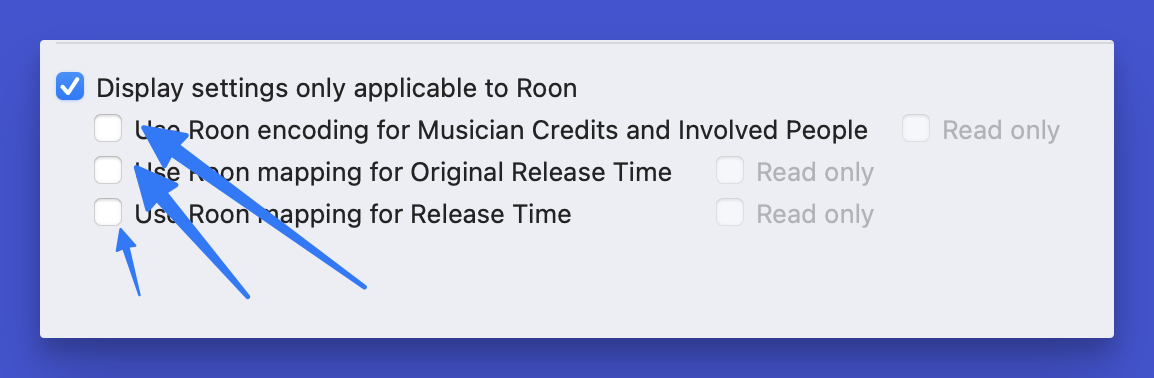
You don't have to reset. However, simply hiding the Roon settings will not work. You must uncheck them all.
Image

DmitryPostMay 5, 2026, 10:17
Newbie
Posts: 16
Registered:
December 30, 2024, 12:32
Normal topicMultiple data in mp4 files

You're right.

By the way, I just checked, and it looked like Run processes all the options of m4a files correctly: ";;;", single atom/multiple data and multiple atoms.
It's a pity, but neither JRiver nor AM do this (even though they should).

One more question: if I disable the Roon's settings, will that cause issues with displaying musician credits in Roon?

2MR2PostMay 5, 2026, 10:27
Avatar photo
Administrator
Posts: 2443
Registered:
August 23, 2012, 19:27
Normal topicMultiple data in mp4 files

Yes it might as the Room specific encoding is the only one which handles all credits.

If Room now supports all encodings, I'll allow the settings to pass when Room is enabled.

V9.2 all be out in a few days. I'll try and put the change in it.

DmitryPostMay 5, 2026, 10:36
Newbie
Posts: 16
Registered:
December 30, 2024, 12:32
Normal topicMultiple data in mp4 files

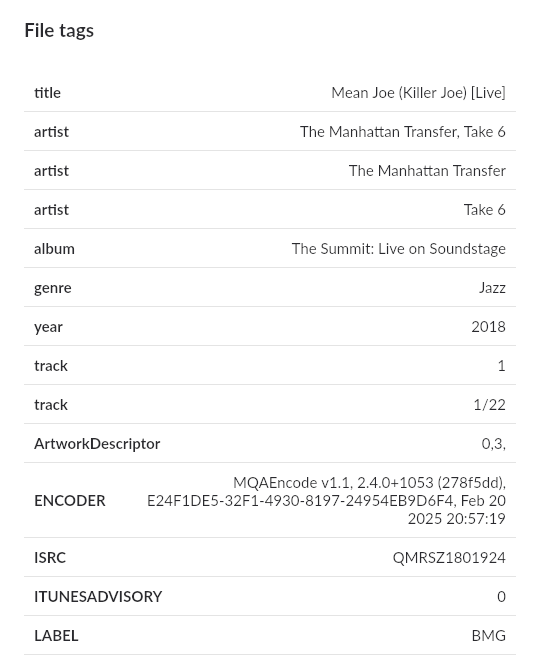
There is a Roon's tag browser for variant with multiple atoms. Don't mind Flac encoder, those are just footprints from the original file.
Image
Image

Pages: 1 2
Mingle Forum by Cartpauj | Version: 1.1.0beta | Page loaded in: 0.021 seconds.