Welcome Guest

Pages: 1 2 3
Changing non-audio file names.
SnowdogPostJuly 9, 2025, 19:31
Pro
Posts: 370
Registered:
March 15, 2022, 17:12
Very Hot topicChanging non-audio file names.

That's amazing, thanks!

Sorry I didn't respond sooner, I've been tied up with work for the last few days.

I use one of my MacBooks for pretty much exclusively doing all the music stuff & the other for everything else, including the photos.

I have a feeling I may have asked this before, but what would be the easiest way for me to treat Yate on the music MacBook as the master (seeing as it's the one where I use this forum & download the actions, etc.) & then export all the actions from one Yate to the other, via a shared folder.

Just so that they're effectively the same, rather than one having some actions & the other having others, I mean.

I assume there's a way of exporting actions as a file. I guess I'd also need to make sure that it replaces the actions in the second Yate, rather than merging or adding. If that makes sense?

I'm away from tomorrow until Sunday, so there may be another delay in replying.

🙂

2MR2PostJuly 10, 2025, 10:50
Avatar photo
Administrator
Posts: 2387
Registered:
August 23, 2012, 19:27
Very Hot topicChanging non-audio file names.

There is a built in mechanism to sync settings between two instances of Yate. I use it to sync settings on my laptop and desktop.

Read the Sync setting in the following document:

https://2manyrobots.com/YateResources/AboutActivating.html

I only tend to have issues when I move from one Mac to another so fast the the Dropbox or GoogleDrive sync hasn't yet occurred. When you start or close Yate holding down the Shift key, the sync is not performed.

You can also do it manually by using Yate>Export Settings and Yate> Import Settings. Make sure that Overwrite is selected when importing.

Let me know if you need more information.

SnowdogPostSeptember 8, 2025, 18:30
Pro
Posts: 370
Registered:
March 15, 2022, 17:12
Very Hot topicChanging non-audio file names.

I'm not sure if this thread is working but the trouble I'm having relates to this action, so I'll continue here & see how we go.

You wrote me an action on page 2 of this thread called:

"https://2manyrobots.com/actions/Prepend-Creation-Date-to-Non-Audio-Files.zip"

It would seem to have worked perfectly when I last tried it (& I think I know why*) but now I'm having trouble.

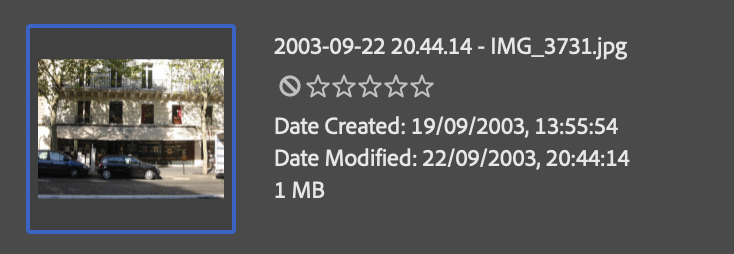
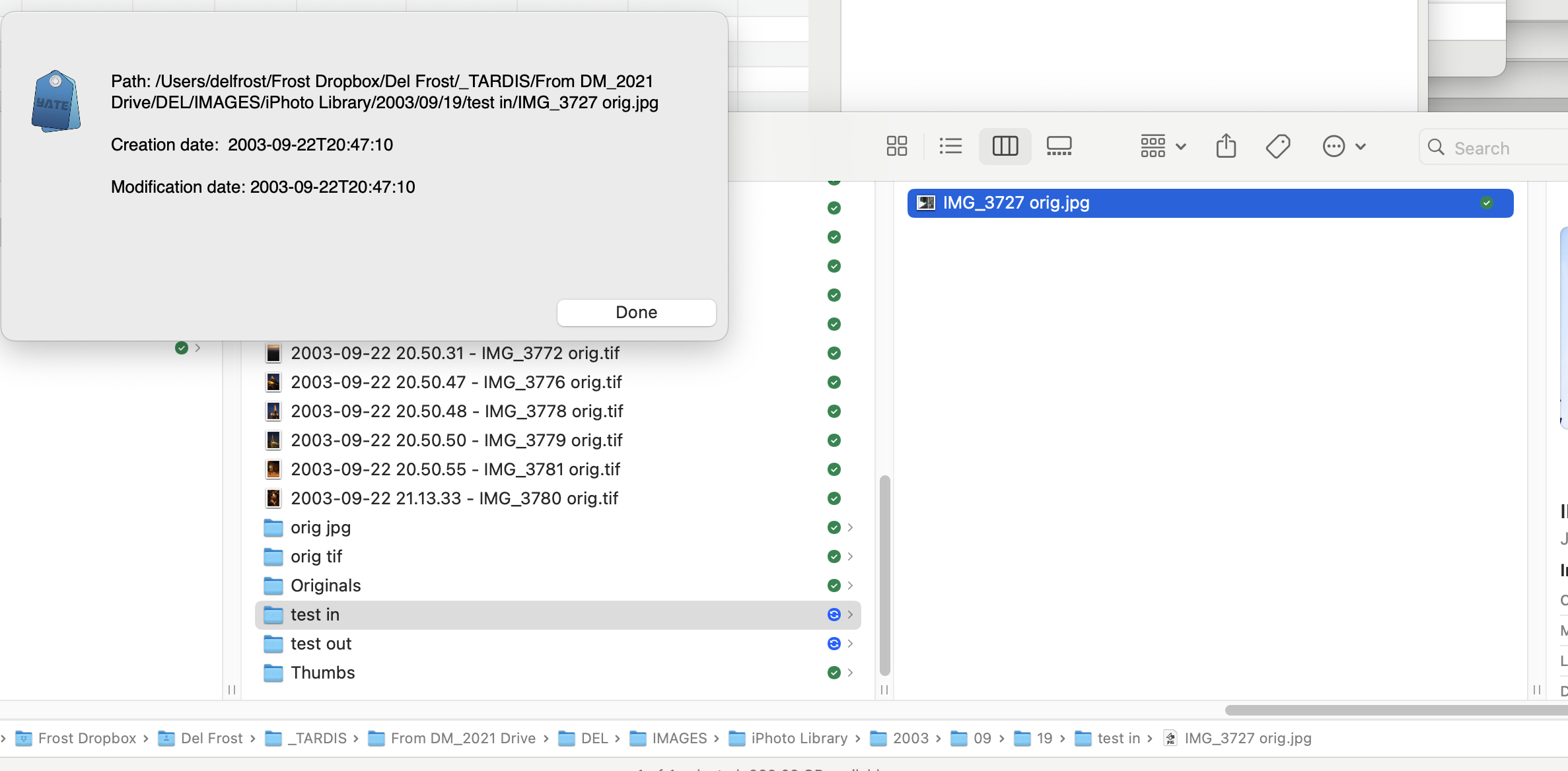
As you can see from the screen shots, the action has taken the modification date & not the creation date as the file name.

*These days, I don't do anything to the files until they're named correctly, but these files, being so old, have presumably been acted upon by various copying, uploading & god knows whatever processes & have taken a new modification date for some reason.

I'm actually shocked that the creation date is still in there. My kids send me photos on WhatsApp all the time & all of the useful info is completely gone!

Anyways, can it be altered to get the creation date & not the modification date?

Image
Image

2MR2PostSeptember 8, 2025, 19:25
Avatar photo
Administrator
Posts: 2387
Registered:
August 23, 2012, 19:27
Very Hot topicChanging non-audio file names.

I've just tried the action and it's working for me. I'm running the action at the previously specified link.

I know some remote filesystems do not support Creation Date and only have a Modification date. This does not seem to be the case here as displayed in your second screenshot.

Lets try this. Download the action at: https://2manyrobots.com/actions/Test-Creation-Date.zip

Run the Test Creation Date action. Select a single file. Try the file displayed above. The action will display a panel showing the creation and modification dates and open a Finder window with the file selected. You can do a Get Info in the Finder to see their dates. The contents of the Yate panel are copied to the clipboard.

Let me know what you find.

SnowdogPostSeptember 8, 2025, 19:41
Pro
Posts: 370
Registered:
March 15, 2022, 17:12
Very Hot topicChanging non-audio file names.

Okay, so I ran that & nothing happened, I just got the pop-up as per the first screenshot. Oddly, the pop-up seems to be saying that the creation date & modification date are the same even though it's prepended neither.

Interestingly, when I did a "get info" on the file, as far as Mac OS is concerned, the creation & modification dates are the same so the previous action is acting correctly.

It appears to only be Adobe Bridge that can see the very original creation dates, along with lens & apperture info, etc.

Weird!

Maybe I'll just have to enter them manually.

Image
Image

SnowdogPostSeptember 8, 2025, 19:43
Pro
Posts: 370
Registered:
March 15, 2022, 17:12
Very Hot topicChanging non-audio file names.

(I have an early start, so I won't see any further replies until tomorrow morning & may not have time to respond until tomorrow evening.)

2MR2PostSeptember 8, 2025, 19:52
Avatar photo
Administrator
Posts: 2387
Registered:
August 23, 2012, 19:27
Very Hot topicChanging non-audio file names.

The action I sent only displays the panel. It does not rename the file.

Yate only sees what the Mac sees. In this case the Creation and Modification dates are the same. It may be due to how you're accessing the files. Are they remote and if so what protocol are to using to access them. SMB, AFP, NFS, etc.

SnowdogPostSeptember 9, 2025, 09:29
Pro
Posts: 370
Registered:
March 15, 2022, 17:12
Very Hot topicChanging non-audio file names.

Okay, cool.

The files are in folders on my Dropbox & are set to be local, so I guess that means that they're on my desktop with duplicates in the cloud.

I have no idea what protocol I'm using but if you know a way I could find out then please do let me know.

2MR2PostSeptember 9, 2025, 10:00
Avatar photo
Administrator
Posts: 2387
Registered:
August 23, 2012, 19:27
Very Hot topicChanging non-audio file names.

Sorry. If they're files sitting in Dropbox the issue I was discussing does not apply. Adobe is more than likely reading the info from the embedded EXIF data which is not something I can just toss together. .... for now

SnowdogPostSeptember 9, 2025, 10:03
Pro
Posts: 370
Registered:
March 15, 2022, 17:12
Very Hot topicChanging non-audio file names.

Righto. Well, I still have the action for more recent photos & the metadata that Adobe Bridge can see is the perfect resource for me in the meantime. Thanks, as ever.

Pages: 1 2 3
Mingle Forum by Cartpauj | Version: 1.1.0beta | Page loaded in: 0.066 seconds.